- Category:
- Workflow Tips
- Summary:
- Which free graphic design software should you use? Compare GIMP, Inkscape, Canva, and Blender for photo editing, vector logos, social media, and 3D modeling.
No single tool fits every project. Your choice depends on what you're creating: photo composites, vector logos, social media graphics, 3D models, or UI layouts.
Start here If you need a free Photoshop alternative, start with GIMP (raster editing) or Photopea (browser-based). For vector logos and illustrations, Inkscape is the go-to free tool. Non-designers creating social media posts should try Canva. For 3D modelling, Blender is the standard free option. These four tools cover the vast majority of graphic design tasks without spending a cent.
Photo editing, Vector design, Online drag‑and‑drop, 3D modelling, UI/UX
Which Free Tools Serve as Photoshop Alternatives?
If you're migrating from Adobe Photoshop, three free tools consistently appear in community discussions: GIMP, Photopea, and Krita. Each approaches raster image editing differently, so the best fit depends on your workflow.
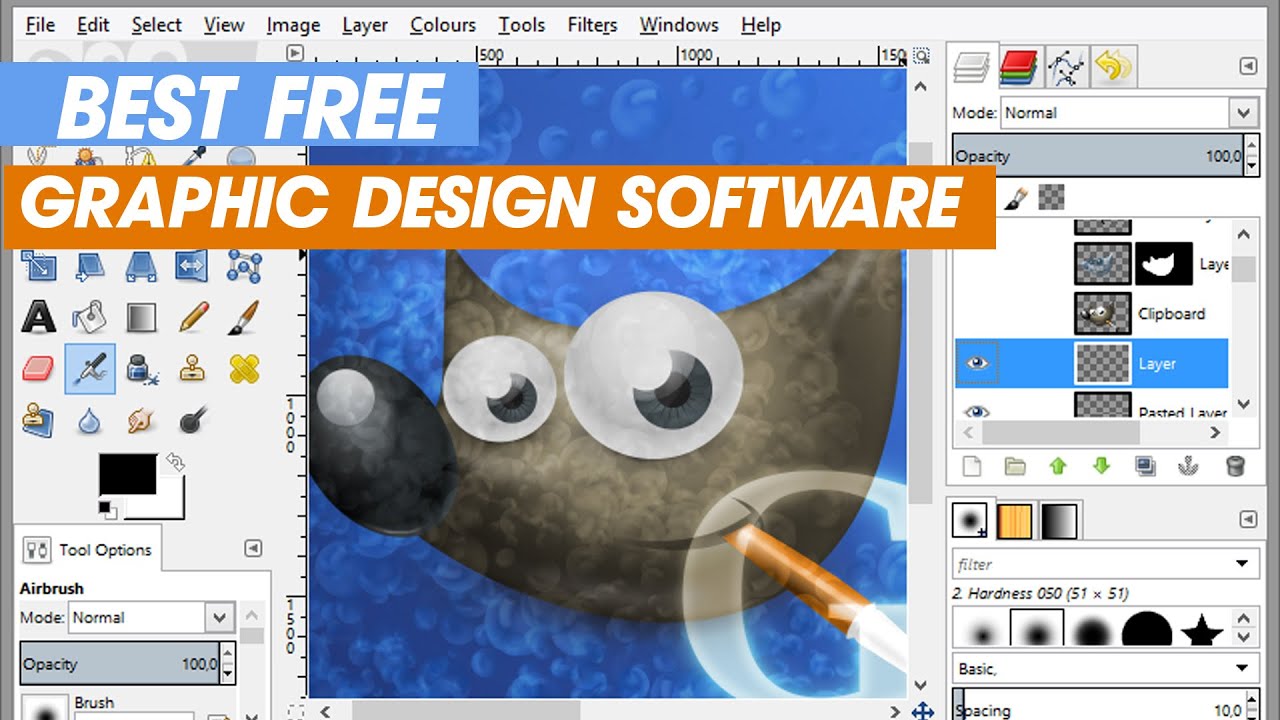
The GIMP workspace — one of the most feature-rich free raster editors available (Creative Bloq).
GIMP — The Full-Featured Raster Workhorse
Creative Bloq describes GIMP as "the most feature-rich software you'll get for no money." It supports layers, masks, advanced selection tools, colour correction, and a wide ecosystem of plugins. However, its interface differs significantly from Photoshop's, which can frustrate new users. One Reddit user noted that "adding a border in GIMP requires many steps" compared to the one-click action in Photoshop.
Tip: If you're moving from Photoshop, invest an hour learning GIMP's layer mask workflow and shortcut keys. The learning curve is front-loaded; once it clicks, GIMP handles most retouching and compositing tasks effectively.
Photopea — Photoshop in Your Browser
Photopea runs entirely in the browser and deliberately mimics the Photoshop interface. A Reddit user in the r/Design community recommended Photopea as "a free Photoshop alternative that works in a browser" with no installation required. It handles PSD files natively, supports layers, masks, and most common filters. The downside: it relies on an internet connection and displays occasional ads in the free version.
Krita — Built for Illustration and Painting
While GIMP targets general photo editing, Krita excels at digital painting and illustration. A Reddit contributor observed that Krita is "in some aspects even better than Photoshop, has less good things but also less bad things." Krita also offers an Android version, making it a useful option for tablet-based drawing.
| Tool | Best for | Platform | Key limitation |
|---|---|---|---|
| GIMP | Photo retouching, compositing | Windows, macOS, Linux | Different UI from Photoshop; steeper initial learning |
| Photopea | Quick PSD edits, browser use | Any browser | Requires internet; limited advanced filters |
| Krita | Digital painting, illustration | Windows, macOS, Linux, Android | Less suited for heavy photo manipulation |
Which Free Vector Tools Work for Logos and Illustrations?
Vector graphics are essential for logos, icons, and scalable illustrations. The free ecosystem offers robust options, with Inkscape leading the pack.
Inkscape — The Standard Free Vector Editor
Inkscape handles SVG natively and covers most tasks you'd typically use Adobe Illustrator for. A Reddit user on r/graphic_design recommends Inkscape "for stuff you'd usually do on Illustrator." Professional designer Ospina Etuki also lists Inkscape as a primary free vector tool on Quora. It includes bezier curves, boolean operations, text on path, and a powerful node editor.
Affinity Designer — A Note on Licensing Changes
Affinity Designer was once a popular low-cost one-time purchase alternative. However, Reddit users reported in October 2025 that the Affinity store closed following the Canva acquisition and that a membership model may return. If you're looking for a permanent free option, Inkscape is the safer bet. Always check Affinity's current pricing before committing.
Figma for Collaborative Vector UI Work
Creative Bloq highlights Figma as the best free tool for UI/UX design, particularly for real-time collaboration. Its vector editing capabilities are excellent for screen design, icons, and component-based workflows. The free tier supports unlimited editors with a limited number of projects.
Heads up: If you rely on Affinity Designer, monitor the official website for licensing updates. The uncertainty around perpetual licenses makes Inkscape a more predictable free choice for long-term projects.
Which Online Graphic Design Tool Should Non-Designers Use?
Browser-based tools remove the need for installation and are designed for speed. They work well for social media graphics, mockups, flyers, and pitch decks.

Browser-based design tools (like Gravit Designer and Canva) let you create promotional graphics quickly without a local install.
Canva — A Widely Used Online Design Hub
Tortoiselabs calls Canva a "free online graphic design hub" noting they keep a Canva tab "perpetually open for pitch decks, social icons, and mockups." It offers thousands of templates, a drag-and-drop editor, and team collaboration features. The free version includes a generous library of photos, fonts, and elements. Canva is particularly strong for non-designers who need polished results quickly.
BeFunky — Template-Rich Alternative
BeFunky provides a library of templates for flyers, posters, cards, and social media. The company claims its tool is "leading the way" for accessible design. While its feature set overlaps with Canva, BeFunky's free tier includes a solid selection of effects and collage layouts that appeal to casual users.
LunaPic — Quick Edits in Seconds
Tortoiselabs describes LunaPic as "Photoshop for Dummies" — a simpler option for one-click effects like cropping to a circle, black-and-white conversion, or kaleidoscope patterns. It's not a full replacement for GIMP or Canva, but it's handy for fast, fun edits without learning a complex interface.
Helpful Chrome Extensions
Two browser extensions worth adding: WhatFont identifies typefaces on any web page, and Color Tab captures colour palettes from sites you browse. Both are mentioned by Tortoiselabs as free tools that support design work without being editors themselves.
What About 3D, Layout, and UI Design?
Beyond raster and vector editing, free software also covers 3D modelling, print layout, and user interface design. Each category has a clear community favourite.
Blender — Complete 3D Creation Suite
Blender handles modelling, sculpting, animation, rendering, and compositing — all for free. A Reddit user on r/graphic_design includes Blender as the go-to free 3D tool. However, Blender's system requirements have grown with recent versions. Users with lower-spec hardware (e.g., an i5 with 6 GB VRAM) may struggle. The same Reddit thread suggests using Blender version 2.74 on older machines — it's far lighter while still capable for basic modelling and animation.
Scribus — Free Print Layout Alternative
If you need to replace Adobe InDesign for multi-page documents, brochures, or magazines, Scribus is the most capable free option. The same r/graphic_design thread mentions Scribus as a free layout tool. It supports master pages, typographic controls, PDF export, and CMYK colour — essential for print production.
Figma — UI/UX Design with Real-Time Collaboration
Creative Bloq identifies Figma as the best free tool for UI/UX design, highlighting its collaboration features. Multiple team members can edit the same file simultaneously, making it popular for product design teams. The free tier includes unlimited editors (with a cap on project count) and sufficient component libraries for most prototyping needs.
| Category | Free tool | Primary use case | System consideration |
|---|---|---|---|
| 3D modelling | Blender | Animation, product viz, scenes | v2.74 runs on older hardware |
| Print layout | Scribus | Brochures, magazines, PDFs | Steep learning curve for complex docs |
| UI/UX design | Figma | Wireframes, prototypes, icons | Browser-based; free project limit applies |
What Problems Do Users Actually Face with Free Software (and How to Solve Them)?
!YouTube thumbnail showing Windows macOS and Linux logos on a laptop screen – free graphic design software runs across all major platforms
Free design tools are available across Windows, macOS, and Linux, but each platform brings its own quirks.
Community forums reveal recurring pain points. Here are the most common issues and practical workarounds drawn from real user experiences.
GIMP's Unintuitive Interface
Several Reddit users describe GIMP as "clunky" or unintuitive, especially for simple tasks. One user complained that "adding a border in GIMP requires a lot of steps." The solution: learn GIMP's specific workflow for common actions. For example, to add a border: Layer → Transparency → Alpha to Selection → Edit → Stroke Selection. Once you internalise these sequences, the speed improves considerably.
Blender Performance on Low-End PCs
Blender's newer versions demand a modern GPU. A user with an i5 processor and 6 GB VRAM reported struggling with performance; the community recommended downgrading to version 2.74. This older build runs on integrated graphics and is stable for learning the fundamentals of modelling and animation.
Pirated Adobe Auto-Updates
Some users attempt to run pirated Adobe software, only to have auto-updates break their setup. One Reddit thread advised disabling internet access for that specific application via firewall rules. A better long-term approach: migrate to GIMP, Photopea, or Inkscape — they match most Adobe features without licensing or security risks.
Affinity License Uncertainty
With Affinity's store closure in October 2025 following the Canva acquisition, users who bought perpetual licenses are uncertain about future access. Community speculation points to a possible membership model returning around October 30. Until the situation stabilises, Inkscape or Photopea serve as reliable free fallbacks.
Need for Mobile Design Tools
Designers on the go often ask for Android or iOS alternatives to Procreate. Krita's Android version is one of the few full-featured free painting apps available outside the Apple ecosystem. Canva's mobile app also covers social media design tasks effectively on phones and tablets.
Key takeaway: Most free-tool frustrations stem from interface differences or hardware limits. A short adjustment period — or using an older software version — resolves the majority of complaints.
Which Free Graphic Design Software Should You Pick? (Decision Framework)
There's no universal recommendation — the right tool depends on your primary task, your experience level, and the platform you use. The table below maps common user profiles to the most suitable free tools.
| If you are... | Start with | Also consider |
|---|---|---|
| A non-designer creating social media posts | Canva (browser) | BeFunky for quick template edits |
| A photographer needing raw editing and retouching | GIMP (desktop) | Photopea for fast browser-based edits |
| A logo designer or illustrator | Inkscape (vector) | Figma for collaborative icon/UI work |
| A digital painter or concept artist | Krita (desktop or Android) | GIMP for post-processing layers |
| A UI/UX product designer | Figma (browser) | Inkscape for complex vector assets |
| A 3D modeller or animator | Blender (v2.74 for low-spec) | — |
| A print designer doing multi-page layouts | Scribus | Canva for simpler one-page flyers |
A Cross-Tool Workflow Example
Free tools work well together. A typical project pipeline might look like this:
- Inkscape — create a vector logo and export as SVG.
- GIMP — open the SVG, add texture, shadows, and photographic backgrounds.
- Canva — import the finished graphic and combine it with a social media template for final posting.
This approach leverages each tool's strength: precise vectors in Inkscape, advanced raster effects in GIMP, and rapid layout in Canva.
Final Guidance
If you're just starting out, pick the tool that matches your next project, not the one that covers the most features. A beginner making Instagram posts should open Canva first. A photographer editing headshots should install GIMP. A designer building a brand identity should learn Inkscape. As your skills grow, you can integrate additional free tools into your workflow without ever reaching for a credit card.
All trademarks, product names, and referenced content belong to their respective owners. Tool recommendations are based on community feedback and professional reviews as of September 2026.