- Category:
- Background Removal
- Summary:
- Compare remove bg API pricing, speed, and integration code across top providers like Remove.bg, Poof.bg, and Cloudinary with free tiers and code samples.
At a glance. The remove.bg API offers 50 free requests/month with up to 50 MP output, but migrates to Leonardo.Ai on Dec 1, 2026. Poof.bg provides 100 free credits/month, processes images in under 2 s, and claims a base price of $0.001/image. Photoroom reportedly gives 200 free credits (unlimited with watermark). Cloudinary includes background removal in its media platform. This article compares pricing, speed, and integration steps — with code samples for Python, Node.js, CLI, and PHP.
Side‑by‑Side Pricing and Feature Comparison
This table compiles the free‑tier allowances, paid plans, speed claims, and security posture of four background‑removal APIs. Figures are sourced from remove.bg’s official API page, Poof.bg, community reports on Reddit, and Cloudinary.
| Provider | Free Credits / Month | Paid Tiers | Extra Credit Cost | Max Input Resolution | Speed Claim | GDPR / Security |
|---|---|---|---|---|---|---|
| Remove.bg | 50 requests | Pay‑per‑use (not publicly listed) | Not disclosed | 50 MP output | Not stated | Not mentioned on docs |
| Poof.bg | 100 credits | $9–$299/mo (2k–200k credits) | $0.001/image base; top‑up $10/1k credits | 6 K (36 MP) | <2 s per image | GDPR compliant, in‑memory processing |
| Photoroom | 200 credits (Reddit report); 10 official | Unlimited with watermark (Reddit) | Not disclosed | Not stated | Not stated | Not stated |
| Cloudinary | Free tool (no explicit limit) | Part of broader Cloudinary plans | Not disclosed | Depends on plan | Not stated | Part of Cloudinary platform |
Migration note: Remove.bg’s background removal moves to Leonardo.Ai on Dec 1, 2026. Free‑tier users should plan their migration before this date. Remove.bg API page.
Remove.bg API – Detailed Look at Pricing, Limits, and Migration
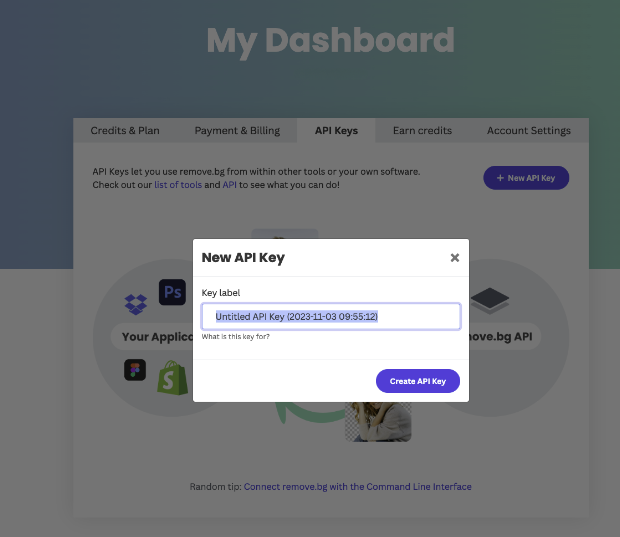
Remove.bg API dashboard — users need an API key to authenticate requests.
Free Tier and Output Limits
The remove.bg API provides 50 free requests per month. Each processed image can be output at up to 50 megapixels. When using the CLI tool with the --size full flag and zip format, the maximum resolution is 25 MP — a detail worth noting for batch workflows.
Supported Input and Output Formats
You can send an image either by direct upload or by supplying a public image URL. The API returns the result as an image file (PNG by default) or as JSON containing metadata. This flexibility makes it straightforward to integrate into both server‑side and client‑side applications.
Upcoming Migration to Leonardo.Ai
As announced on the official API page, background removal functionality will move to Leonardo.Ai on December 1, 2026. Developers currently relying on remove.bg’s free tier should evaluate migration options — either to Leonardo.Ai’s platform or to an alternative provider — before that date.
Code Sample Languages
The official documentation ships ready‑to‑use samples in cURL, Node.js, Python, Ruby, PHP, Java (Android), and Objective‑C (iOS). This broad language support lowers the integration barrier for teams working across different tech stacks.
Poof.bg – Deep Dive into Cost, Speed, and API Features
Pricing Plans and Top‑Up Options
Poof.bg positions itself as a cost‑efficient alternative. The free tier grants 100 credits per month. Paid plans start at $9/month for 2,000 credits (Pro) and scale up to $299/month for 200,000 credits (Giga). A top‑up of $10 buys 1,000 extra credits, and the base rate works out to roughly $0.001 per image — the company claims this is “200× cheaper than remove.bg”.
- Processing speed per image: <2 s
- Uptime SLA: 99.9%
- Confidence score example: 99.8%
- Max input resolution (36 MP): 6 K
Performance Benchmarks – Speed and Confidence Score
Poof.bg uses GPU‑accelerated inference and reports a per‑image processing time of under 2 seconds with a 99.9% uptime SLA. The API returns a confidence score with each result — a documented example shows a value of 99.8%, which can be used to automatically flag low‑confidence outputs for manual review.
Supported Formats and Security
- Input formats: JPG, PNG, WebP — max file size 20 MB, max resolution 6 K (36 MP).
- SDKs: Python and TypeScript SDKs with typed commands for cleaner integration.
- Security & compliance: GDPR compliant; images are processed in‑memory and not stored on disk.
Photoroom API – Community Insights and Free Credit Offer
Reddit User Claim – Higher Quality
In a Reddit discussion about free background‑removal API recommendations, one community member described Photoroom as “the higher quality background removal API.” This is an anecdotal claim — no independent benchmarks were provided — but it reflects a perceived edge in output quality, particularly for complex edges like hair or fur.
Free Credits and Watermark Limit
According to the same Reddit thread, Photoroom offers 200 free credits and allows unlimited usage with a watermark. The official pricing page could not be verified at the time of writing, so these figures should be treated as community‑reported rather than officially confirmed.
Developer Demand – Flutter Integration
The Reddit user who started the thread was specifically looking for a free background‑removal API for a Flutter app. This highlights a growing need for mobile‑friendly API solutions that work with cross‑platform frameworks. Developers building with Flutter can call any of these APIs via the http package, using the same endpoints shown in the code samples later in this article.
Cloudinary’s Free Background Removal Tool
Cloudinary provides a free background removal tool and API as part of its broader media‑management platform, which includes CDN delivery, image transformations, and batch processing. No explicit free‑tier limit is listed on the tool page; instead, background removal is bundled into Cloudinary’s existing plan structure. This option is most attractive for teams already using Cloudinary for image hosting and optimisation, since it removes the need to add a separate provider.
!cURL command example displayed on a monitor for calling a background removal API
Typical one‑line cURL API call — the same pattern works across most background‑removal services.
How to Integrate Remove BG APIs – Code Examples and Step‑by‑Step Guides
Using Remove.bg with Python (requests library)
The following script sends an image URL to the remove.bg API and saves the result to a file. It includes basic error handling for HTTP status codes.
#!/usr/bin/env python3
import os
import requests

API_KEY = os.environ["REMOVEBG_API_KEY"]
IMAGE_URL = "https://example.com/input.jpg"

resp = requests.post(
    "https://api.remove.bg/v1.0/removebg",
    data={"image_url": IMAGE_URL},
    headers={"X-Api-Key": API_KEY},
)

if resp.status_code == 200:
    with open("output.png", "wb") as f:
        f.write(resp.content)
    print("Saved output.png")
else:
    print(f"Error {resp.status_code}: {resp.text}")
!Python script in Visual Studio Code demonstrating remove.bg API integration for background removal
The Python code above running in VS Code — a template you can adapt for your own projects.
Batch Processing with the Remove.bg CLI Tool
The official CLI tool (npm package) lets you process entire folders with a single command. Set your API key in the environment variable REMOVEBG_API_KEY, then run:
remove-bg --size full --format zip input_dir/
By default, the CLI confirms before processing batches of 50 images — a safeguard against accidental over‑usage. Override it with --no-confirm for fully automated pipelines. The zip format outputs images at up to 25 MP.
Using the PHP Wrapper for Remove.bg
For Laravel or plain PHP projects, the Composer package mtownsend/remove-bg supports URL, file path, and base64 inputs:
use Mtownsend\RemoveBg\RemoveBg;

$result = RemoveBg::fromUrl($apiKey, $imageUrl);
file_put_contents('output.png', $result->getImage());
Note on Poof.bg SDKs
Poof.bg provides Python and TypeScript SDKs with typed methods. A Python call looks similar to the remove.bg example above, but uses the Poof.bg endpoint and your Poof.bg API key. The SDKs handle retries, confidence‑score parsing, and error responses out of the box.
Advanced Techniques and Use Cases
Automating Batch Background Removal with the CLI Tool
Combine the remove.bg CLI with cron (Linux) or GitHub Actions for recurring batch jobs. Set REMOVEBG_API_KEY as a secret, add --no-confirm, and point the output to a timestamped folder. The default 50‑image confirmation safeguard prevents surprise bills, but can be disabled once you’ve validated the pipeline.
Using API Confidence Scores to Flag Poor Results
Poof.bg returns a confidence score (e.g., 99.8%). You can set a threshold — say 0.95 — and automatically route images below that value to a manual‑review queue. This pattern is particularly useful for e‑commerce catalogs where edge quality matters for product photos.
# Pseudocode: confidence‑based routing
score = response.json()['confidence']
if score < 0.95:
    send_to_review_queue(image_id)
else:
    save_to_catalog(image_id, result)
Integrating with Figma and Flutter
Figma users encountering issues with the manual mask method can call a background‑removal API from a Figma plugin via HTTP. Similarly, Flutter developers can use the http package to call any of these APIs directly from a mobile app. The flow is straightforward: app sends image → API returns processed file → app displays or saves the result.
Where to Find Reliable Documentation and Support
Each provider offers distinct documentation resources. Here are the authoritative sources for the tools covered in this article:
- Remove.bg official API docs (remove.bg/api): Complete reference with code samples, error codes, and migration details. Best place to start for first‑time integration.
- Poof.bg website (poof.bg): Pricing tiers, SDK documentation, confidence‑score explanation, and GDPR compliance details.
- Remove.bg CLI GitHub repository (github.com/remove-bg/remove-bg-cli): Installation instructions, CLI options, and batch‑processing examples.
- PHP Wrapper on GitHub (github.com/mtownsend5512/remove-bg): Composer package with support for URL, file path, and base64 inputs — ideal for Laravel projects.
- Cloudinary Background Remover (cloudinary.com/background-remover): Free tool overview and integration with Cloudinary’s media platform.
Each link points to the primary source for its respective provider or tool. Bookmark the one that matches your tech stack for quick reference during implementation.