- Category:
- Workflow Tips
- Summary:
- Remove.bg pricing includes free 0.25MP previews, $3/3 credits PAYG, and subscriptions: Lite $9/40, Pro $39/200, Volume+ $89/mo, all with high-res & white-label.
Remove.bg Pricing at a Glance: Remove.bg offers a free tier (0.25 MP previews), Pay‑As‑You‑Go ($3 for 3 credits), and three subscriptions: Lite ($9/mo, 40 credits), Pro ($39/mo, 200 credits), and Volume+ ($89/mo). All paid plans include high‑resolution downloads and white‑label branding.
Plans at a Glance – What Each Tier Costs
Remove.bg structures its pricing around a credit system, where one credit typically covers one high-resolution background removal. Below is a breakdown of each tier, including recent updates that now provide all resolutions and white-label features across every paid plan.

Remove.bg pricing tier overview — free, Lite, Pro, and Volume+ plans (Source: SLR Lounge)
Free Plan – Is It Enough?
The free plan serves as a testing ground. You get access to preview-level resolutions capped at 0.25 megapixels and one complimentary credit for a full-resolution download across your account's lifetime. For API users, the free tier allows up to 50 preview-resolution calls per month, which is ideal for development testing but not production use.
User-reported limitation: Some users on the Figma forum have reported a "limit until next day" message, suggesting an undocumented daily cap on the free tier beyond the monthly 50 previews. If you hit this wall, keep a Pay-As-You-Go credit bundle handy to avoid workflow interruptions.
- Resolution cap: 0.25 MP (preview only). Official Help page
- API calls: 50 previews / month. Official Blog
- Daily limit bug: Reports on the Figma Community Forum.
Pay-As-You-Go – When You Need Just a Few Images
The Pay-As-You-Go (PAYG) option is designed for users who need background removal infrequently. Pricing sources indicate a starting block of 3 credits for $3, working out to $1.00 per credit. (Note: some third-party trackers list a $5 starting point; the $3 for 3 credits is the more current figure cited by multiple sites like Alternatives.co.) Credits do not expire, making this an ideal safety net for occasional use.
Best for: One-off images, topping up a subscription, or testing the service before committing.
Alternatives.co pricing comparison | Softwarefinder plan data
Lite Plan – $9/Month for Small Projects
At $9 per month for 40 credits, the Lite plan brings the per-image cost down to roughly $0.225. This plan suits personal portfolios, social media content, or very small online stores. With 40 credits, you can process about one batch of product images per week.
40 credits $0.225 / image
Pro Plan – $39/Month for Regular Users
With 200 credits included each month, the Pro plan reduces the per-image cost to approximately $0.195. This is the most popular tier for growing e-commerce stores and small agencies handling around 150–200 product images per month. It also provides access to integrations like Google Drive, OneDrive, Zapier, and Figma.
200 credits $0.195 / image
Volume+ Plan – $89/Month for High-Volume Work
Remove.bg does not publicly specify the exact credit count for the Volume+ tier. Third-party estimates, such as those from Alternatives.co, list the price at $89 per month but the credit allocation remains unconfirmed. If it aligns with 200 credits, the cost per image would be approximately $0.445, which is higher than the Pro plan. This suggests that Volume+ may include additional features like priority processing or advanced batch tools.
Pro tip: If you are processing more than 500 images per month, contact Remove.bg sales directly to negotiate a custom volume price. The published plans may not reflect the best available rate.
API Pricing – Developer Options
Developers can access Remove.bg through its API. The free tier provides 50 calls per month at preview resolution. For higher volumes, API credits are drawn from the same subscription pools as the web interface. All subscriptions are backed by a 14-day money-back guarantee, allowing you to test the API fitment risk-free. The API supports integrations with Figma, Zapier, Make, and mobile apps on Android.
- Free tier: 50 preview-resolution calls / month.
- Paid API: Uses the same credits as web subscriptions.
- Guarantee: 14-day money back on all subscriptions.
Real Cost Per Image – Which Plan Saves You the Most?
To understand the true value of each plan, it helps to compute the cost per image. Here is the breakdown based on official credit allocations:
| Plan | Monthly Price | Credits | Cost per Credit | Per-Image Cost |
|---|---|---|---|---|
| Free | $0 | 0.25 MP previews | — | Free (preview only) |
| Pay-As-You-Go | $3 (one-time) | 3 | $1.00 | $1.00 |
| Lite | $9 | 40 | $0.225 | $0.225 |
| Pro | $39 | 200 | $0.195 | $0.195 |
| Volume+ | $89 | Unconfirmed | ~$0.445 (est.) | ~$0.445 (est.) |
The Pro plan offers the lowest per-image cost at $0.195. Compared to PAYG ($1.00/image), switching to Pro saves over 80% per image if you process 200 images per month. The official remove.bg blog provides a cost comparison against traditional methods: manual editing can take 5 minutes to several hours, while professional outsourcing typically costs between $0.65 and $10 per image. Against these benchmarks, even the Volume+ tier presents a significant cost advantage.
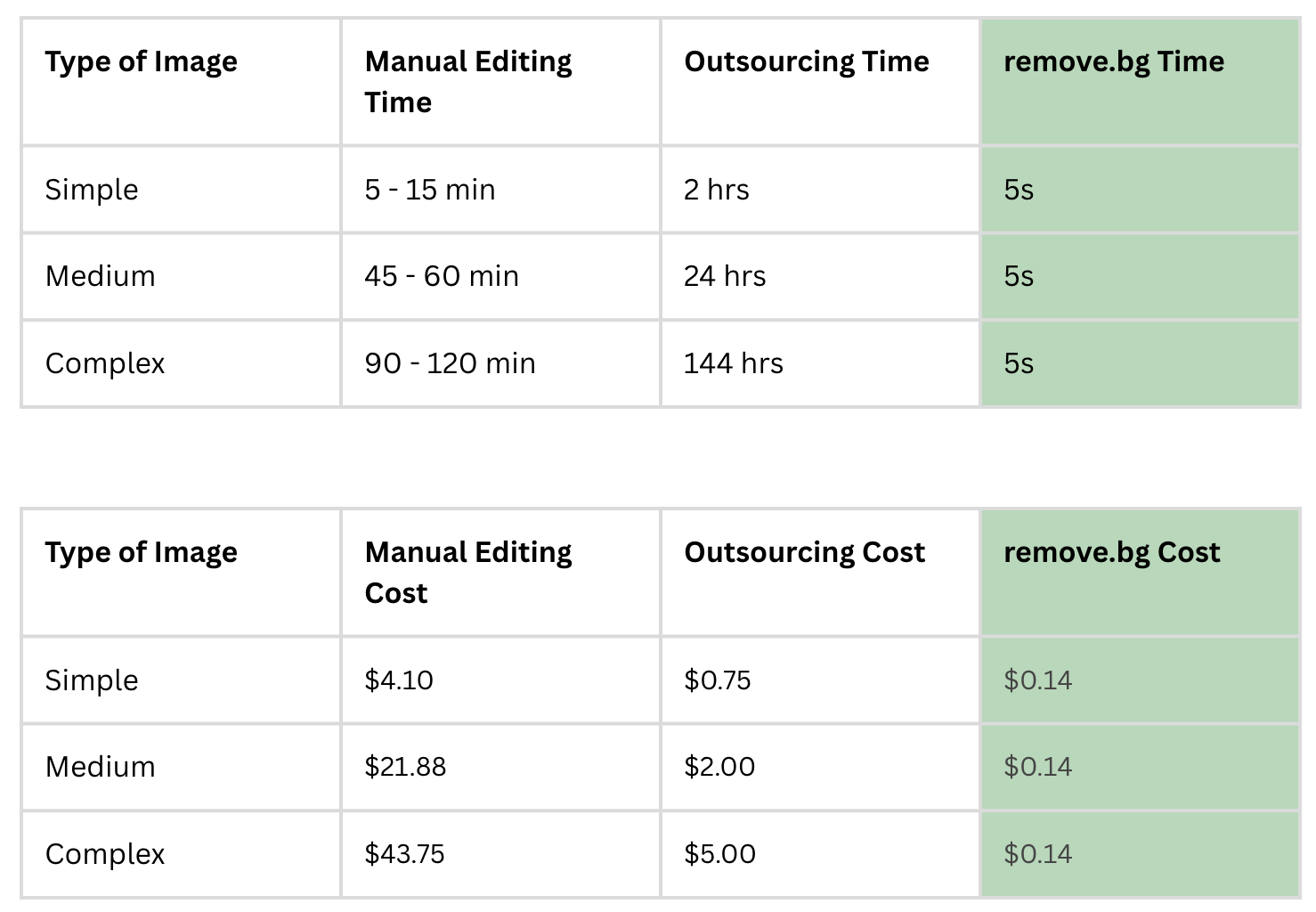
Remove.bg cost analysis vs. manual editing and outsourcing — data from the official remove.bg blog
How to Choose the Right Plan for Your Use Case
Matching your workload to the right plan ensures you aren't overpaying. Below are scenario-based recommendations drawn from industry use cases like e-commerce, automotive, media, and batch processing.
Visual overview of remove.bg credit tiers — match your monthly volume to the right plan (Source: SLR Lounge)
- Small e-commerce store (150–200 images/month): The Pro plan at $39 is the strongest fit. It covers the volume, offers the best per-image rate ($0.195), and includes integrations with platforms like Shopify or Figma.
- Occasional user (under 10 images/month): Start with the free tier for testing, then use Pay-As-You-Go ($1/image) for the handful of high-resolution images you need. This avoids a recurring subscription.
- Large batch processor (1000+ images/month): The Volume+ plan is designed for this, though you may need to contact sales for exact credit details. An alternative workflow could involve the Pro API with multiple seats.
- Developer / SaaS integration: The API free tier is perfect for initial development. Once in production, a Pro API subscription (leveraging the 14-day guarantee) is the recommended starting point.
Common Pitfalls and How to Avoid Them
Even a powerful tool like Remove.bg has quirks. Here are the most frequent user problems and how to solve them.
Pitfall: Daily Free Tier Limit. Users have reported a hard daily cap on the free tier. To avoid workflow interruptions, keep a PAYG credit bundle on hand for immediate needs.
Pitfall: Figma Plugin Setup Difficulties. Some users find the Figma integration challenging to configure. The most reliable fix involves reinstalling the plugin from the Figma community page and clearing the plugin cache. If you need more advanced edge control after removal, consider refining the image in Photoshop — see our guide on using Select and Mask in Photoshop.
Pitfall: Source Image Quality Degrades Results. The AI is highly dependent on input. Low-resolution or poorly lit images produce poor results. Ensure your source images are at least 0.5 MP and have decent contrast against the background. If the source is poor, the AI can't fix it.
Pitfall: Internet Connection Required. Remove.bg requires an internet connection — there is no fully offline mode. For offline flexibility, use the desktop app (available for Windows, Mac, Linux), which supports images up to 50 MP and 22 MB.
How Remove.bg Compares to Alternatives
The background removal market has several competitors, but Remove.bg consistently sets a high standard for complex edges like hair and fur. Below is a comparison with two notable alternatives:
| Feature | Remove.bg | Removebg.bd (Copycat) | Adobe Express |
|---|---|---|---|
| Starting Price | $9/mo (Lite) | $8.25/mo (Starter) | Free tier available |
| Per-Image Cost (Avg) | $0.195 (Pro) | Varied | Limited credits |
| Complex Edges (Hair/Fur) | High standard | Unverified | Good |
| White Label | Free on all paid plans | Likely included | Not standard |
Warning on Copycat Services: A service called "Removebg.bd" offers lower prices ($8.25/mo starter) but is a separate entity. Users should verify they are on the official remove.bg site to ensure data security and consistent quality. The official service is trusted by over 10 million users in 180 countries.
For detailed edge-quality comparisons, Backgroundremover.com provides sample benchmarks showing how Remove.bg handles complex edges like hair and fur compared to other tools.
How to Confirm Your Plan Is the Right Fit
Before committing to an annual subscription, take these steps to ensure you've chosen the right plan:
- Calculate your average monthly image count over the past 3 months. This is your baseline need.
- Match that volume against the per-image costs outlined in the table above.
- Leverage the 14-day money-back guarantee to test the plan against your real workload risk-free.
- Verify features: Confirm that all resolutions and white-label branding are included in your chosen tier (they are, on all paid plans).
- Start with PAYG if you're unsure, track your usage for 30 days, then graduate to Pro or Volume+.
If at any point the plan doesn't match your volume, you can upgrade or downgrade seamlessly. Remove.bg's recent updates ensure that every paid subscription includes the same core features — full resolution and white label — so the only variable is the credit count.